Visar inlägg med etikett School. Visa alla inlägg

måndag 19 maj 2014

Pre-Beta Week

It's eight workdays unitl Gotland Game Conference(GGC) and the end of this schoolyear. This means that we have eight workdays to finnish our game Defunct. All the major parts of the game are in place but there is some small things that still needs to be done, and some things we will skip for GGC such as the level select screen we first planed on having.

Mockup of the level select screen.

Sounds

I implemented the sounds last week. As I said some time ago we are using the FMod studio plugin for unity so to play audio I  need two things: The Event files and the Bank Files.
Events are audio files that have special parameters that control them such as a velocity. Bank Files are files that contains links to the events, so to get an event we have to load a bank and then request an event.
When requesting an event we get a eventinstance which we then use to play sounds.

I created a class called SoundController that (guess what) controlls the sounds, when something wants to play a sound it calls the .PlayEvent() functions which takes a enum as parameter. Preferably this function would take a string since FMod Studio has string bank where you can link events with names, but we couldn't get it to work and it wasn't worth sinking any more time into.
I also created functions that stops, pitches fades and sets the volume of an event.

Feedback

Mikael created a particle effect for when you go out from a checkpoint that I then added to the checkpoints, and to emphasis the speed of it I also play a bit more with the FoV of the camera as you leave the checkpoint.

Directly after leaving a checkpoint

I also did the same thing but with a much much smaller FoV increase when you pick up a small boost, since we've feelt from the start that you don't "feel" the speed you get from the small boosts.

Camera

I spent some time on the camera this week smoothing it up. I realised that i used the physics player to calculate the position of the camera, which is quite dumb since it's moving really jerky since the physics player doesn't tween between the positions. I simply changed it to the graphical representation of the player for all the calculations of the camera positioning. And other smothing and rotation fixes.

Small Things
The small things of this week are some fixes with the ships, and multiplayer.
I chaged the ships up from patrolling to just going forward because it should look like they have a goal, not aimlessly flying about. I made it so that they have a spawnrate and a min and max height where they can spawn, max, min speed that they can have.

I changed the way the checkpoints give force, to balance the checkpoints with the level design we wanted to give less force to the player that already have alot of speed, so i changed them so that the level designers can sett a "fallOfCap" if the player has a velocity above this cap it will get less force that if it was below this cap. The force given is reduced by a variable called "fallOfRate" for each percentage above the cap the players velocity is.
Then I did some other small things such as fixing the restart in multiplayer, tweeked with post-processing effects and things like that.


That's all for today, goodnight and thanks for reading.
-David Forssell

fredag 9 maj 2014

The week of XInput, Checkpoints and "Destructible objects"

The week has come to an end, and for once I thought I whould get this blogging thing out of the way in time, so here I am.
This week I've been doing alot of different things, I re-did how the checkpoint boosts worked, I implemented XInput, a Xbox controller library. I linked our multiplayer lobby to the actual gameplay so the multiplayer works, and a lot more.

Checkpoints

So we got some feedback during the alpha, and one feedback we got was a smal amount of players didn't get the checkpoint boosts we had. In this checkpoint system you hold down a button to charge a boost, and then when you release you gain the momentum you've charged up. So to simplify this we decided to redo them so that they charged themselfs and when you pressed the button you got the momentum.
I personally didn't like this change, since I feelt that we keept the player passive and the charging lost its charm when you didn't charge it youself, but I still decided to give it a chance. So I changed the checkpoint boost to how we decided and we tried it on some people, and none of them liked the changes we did to them.
As I feared I made the player passive, and we decided to revert them to the way they were before. I think that people will understand this system when it's explained to them: "hold button-charge, release-get speed" is not that hard to get.


XInput

XInput is a library for Xbox controlls "But David, you are making your game in Unity doesn't that already have controller support!? Are you a moron!?" Glad you asked random person on the internet, yes we are making our game in the Unity engine and yes it has controller support, BUT it doesn't have full controller support since it can't make a controller vibrate. However it can make a phone vibrate, lazy lazy Unity...
Implementing XInput was easy, only download a package and import it, the only irritating thing is that visual studio doesn't realize that it's in. It gives away errors but unity can still compile and run it like a charm.

To set vibration on a controller I simply have to write: "GamePad.SetVibration(controllerIndex, leftVibration, rightVibration);"

I started with vibration for the Pumping feature, a small vibration when you pump in downhills and a large staggering vibration in uphills, sortof like a coughing engine. This is to make the player feel staggered when pumping in uphills to make them stop, since this makes them lose speed.
I then added a vibration for when the checkpoint boost is fully charged to tell the player to let go, and a small vibration for when the player picks up a small bost, to emphasize the speed increase.
The last vibration I added was for landings, When the player loses alot of speed in its laning I vibrate the controller roughly.

Small things

I created a button that you can spam when you have low speed to gain some speed, I'm not quite sure why we have this, since the problem we had that led to the creation of this button is that "people doesn't respawn at checkpoints when they lose speed". I guese it is to allow the people that don't want to get a good score and only want to cruise to do so.

Petter had made a script that gave objects with a specific tag a rigidbody when you hit them, to make things "destructible", but they didn't reset when you went back to a checkpoint and since I made the respawn system were we reset all the boosts, sparks and so on, I also made the physics objects respawn.
All I did was to make the "PhysObjects" register themselfs in the respawn controller with their position and rotation when they got activated, when you respawn at a checkpoint the respawn controller then removes the rigidbody and places them back at their original position with their original rotation.


I linked the multiplayer lobby Petter translated form my code to the actual gameplaye scene.
To load a different scene in unity you have to change the level prefix of the network, this is just a simple digit that reprisents a level. This is so that the network can filter out any information sent from another level, in adition to that you can also force the network to stop sending information while loading a scene to save bandwidth.


I also created some small scripts not really worth talking that much about, such as a patroling script for some ships that we will have flying over the world.

That's all for today, goodnight and thanks for reading.
-David Forssell

måndag 5 maj 2014

Fmod

The primary artifact I've been working on this week is to implement FMod studio support.
FMod studio is a sound design tool for games that quite recently added support to Unity. FMod studio is not to be confused with the FMod library which Unity already uses internaly to play sounds. The primary use of FMod studio in this project is that we can add variables to what FMod studio calls "Events" the sound designer then uses these variables to change the way the sound behaves. As a programmer I can then access these variables in Unity and change them in runtime to change the sound.

For instance, if we have a event called "Driving" this event has the variables:
Material - For the material of the ground
Velocity - For the speed of the object
Wind - The wind where the object is
Pitch - If we want to pitch the sound (for slomotion)


The Material variable then has some "triggerzones" when it has the value 0 it has a dirt sound, when it passes 0 to 1 it automatically crossfades between dirt and metal since that is what the sound designer has told the sounds to do in this triggerzone. and if we instead go from 0(dirt) directly to lets say 5 which  is stone it will corssfade from dirt to stone, skipping all the materials in-between.
When the Event then is exported it becomes one file that a programmer easily can access all the variables in, instead of having 500 different sound files and creating a system that fades between them when we want by ourselfs. It also means that the sound designer gets exact audio experience it's looking for, since it will sound exactly the same in the game as in their project.

Small Things

So just as the last week this week I've been doing alot of small scripts for the artist, Mikael our lead artist wanted to have some scripts that rotated things towards the camera and panned textures, pulsates lights, making objects move towards the player and so on. Not really that much to talk about those things, they are all basicly 1 row scripts and does exactly what their names suggests.

I also added an aura around the pickups to emphasize their pick-up range, and added the textures on the player.


I'll probably post some video footage later this week.

That's all for today, goodnight and thanks for reading.
-David Forssell

måndag 28 april 2014

Checkpoints and more Networking

Another week has passed and the last week there has been alot of little things to do.
First of the Network HUD I talk'ed about last week was put on hold for more importent single player features and fixes. Oh and we changed the name from Open Circuit to Defunct

Checkpoints

I've redone the respawning system since Robert thought it would be cool to go into this sort of overview where you could toggle between all visited checkpoints and respawn at a selected one.

Is' still a little buggy and some changes will be made, but I liked the general idea more than the system we had previously where you pressed a button and just respawned. However we are thinking to add a quickrespawn button for when you want to respawn from the last checkpoint as fast as posible.

Networking

So the things I did with networking this week was to make it so that when player picked up a boost it disappeared for all the other players aswell. And that's about the networking I did last week, since we had an internal alpha last week the singel player features took some priority.

Small Fixes

I've been doing a lot of smal fixes this week, making things for the artists, for instance if they want something to spin or to make a particle effect start when you pass an object and so on.

That's all for today, goodnight and thanks for reading.
-David Forssell

måndag 21 april 2014

More Camerawork and Spontaneous Networking

It's week 17 and it's three weeks into the big game project, there has been a lot of talk in the group as of late but mostly about level design. But since I'm not one of the level designers I'm not going to talk about that in my blog.

Camera

So the camera has been a top priority as of late, the last two weeks I've been trying out some different camera models. The first one i tired out was a free-rotating that the player had complete controll over, but I also made it snapp back to it's original position behind the player when it hadn't been moved in a while. I then restraint the camera so it couldn't go below the ground and not rotate above the player. Having That whould make the player upside-down or the camera would have to rotate it in the Y-axis make it face-up and I didn't think that would look good.
For the air camera I ended up making it look towards the spot the player would land, this was easy since Petter already calculate the ladningspot for the movement code. All I had to do was to calculate the vector between the camera and landingspot, normalize it and move the camera back x times that vector from the payer to get a nice overview.

HUD

Jonatan feelt that we needed some sort of "overview-button" that when pressed zoomed out the camera and gave the player a huge overview of the area. Robert then came up with the idea that we could display the some sort of HUD on that overview aswell. So i set out on creating this, when the left thubstick is pressed and hold the time slows down and the camera zooms out, the HUD then fades in and shows the player the only info it could want to know.

Networking

So last tuesday we spontaneously decided to add co-op into the game, since this was something that mostly needed programming. I don't have that much to do at the moment other than to create small scripts for the artists like when they want something to spin or a texture to pan and so on. So with that in mind and after countless requests from playtesters to add multiplayer I started to work on the multiplayer. Unity's networking is really grateful to work with and after one day I had a working build.


What I will be working on this week is to reduce the lag and adding some HUD that indicates where the other players are, since you can loose eachother quite easy as it stands.

These images are quick mockups of how that HUD might work.

Wether these HUD's will show at all time or when the player clicks the left thubstick is still under discussion, perhaps we'll make it an option.


That's all for today, goodnight and thanks for reading.
-David Forssell


måndag 7 april 2014

Big game is starting.

Prologue

This week the course "Big Game Project" started, during the weeks leading up to this project we've been working on a concept that Jonatan Keil proposed with the working title "Open Circuit" and thus the group Freshly Squeezed was created. The game is to be created in the Unity engine.
(Click here to read the concept pitch,
The colour errors are due to Google Drive)

Last Week

My primary work last week has been with the boost that are suppose to drive the player forwards, I've also done some work on the checkpointsystem and the mechanics of the checkpoint boost. I've started to work on the camera effects to emphasize the feeling of speed.

The Boosts

(Programming art)

There are three types of boosts, the small boosts used for guidence and the weakest of the boosts. The activation boosts are less common but can be activated when the player chooses with a great bust of force. Lastly we have the checkpoint boosts, when the player enters the area of a checkpoint boost they can charge up a boost that will sling them in the direction of the vector between the player and the boost station.

The small boosts are very straight forward, when the player collide with them they instantly give the player a small amount of force in the players direction, since we're using Unity's rigidbodies all I have to do to accomplish this is too add force to the players rigidbody with the players forward vector.
The activation boost works in a similar fation, but instead of adding the force instantly it adds to a pool of boost power that the player can activate when he/she chooses, upon activation the force is added to the rigidbody.

The checkpoint boosts are the most complex of the boosts but still not that problematic. When the player enters the area of the boost, the time is slowed down, the player now start to charge a boost by holding down a button. The amount of charge is shown by the field of view increasing(as shown below), the output direction is shown by the yellow line on the ground(emphasised with red in the picture below), when the player releases the button he/she will be slingshot in this direction.
(I'm no artist, as you can see)
We had a various of ideas for the checkpoints that I concepted and tested, one idea was that when you entered the area of the checkpoint you lose control of the player and start to controll the output-direction arrow. But to make this feel good I had to add a diablo-esc camera perspective so you gott a better overview of the arrow, however we felt that this checkpoint model took you out of the gameplay and ruined the "flow" that is the key feature of this game hence we went with the other checkpoint version.

The Camera Effects

So I talked a bit about changing the FoV(Field of View) of the camera, and this is right now also our primary speed effect. Currently I change the FoV of the camera depending on the players Velocity, clamping it between 60-120 FoV. I also add some Bloom and motion blur to the camera, however all of these effects are subject to change.

The Checkpoints

Right now we are talking about how we want to handel the Checkpoints, we are currently leaning towards a model where you can toggle between all the checkpoints you've passed during your playthrough of the level. So if you want to go back more than one checkpoint that is entirely possible. When going back to a previous checkpoint the time is reset to the time you had when passing that checkpoint, however a penalty is added to your time, stopping you from just reseting form the checkpoint over and over again.


Fog of War

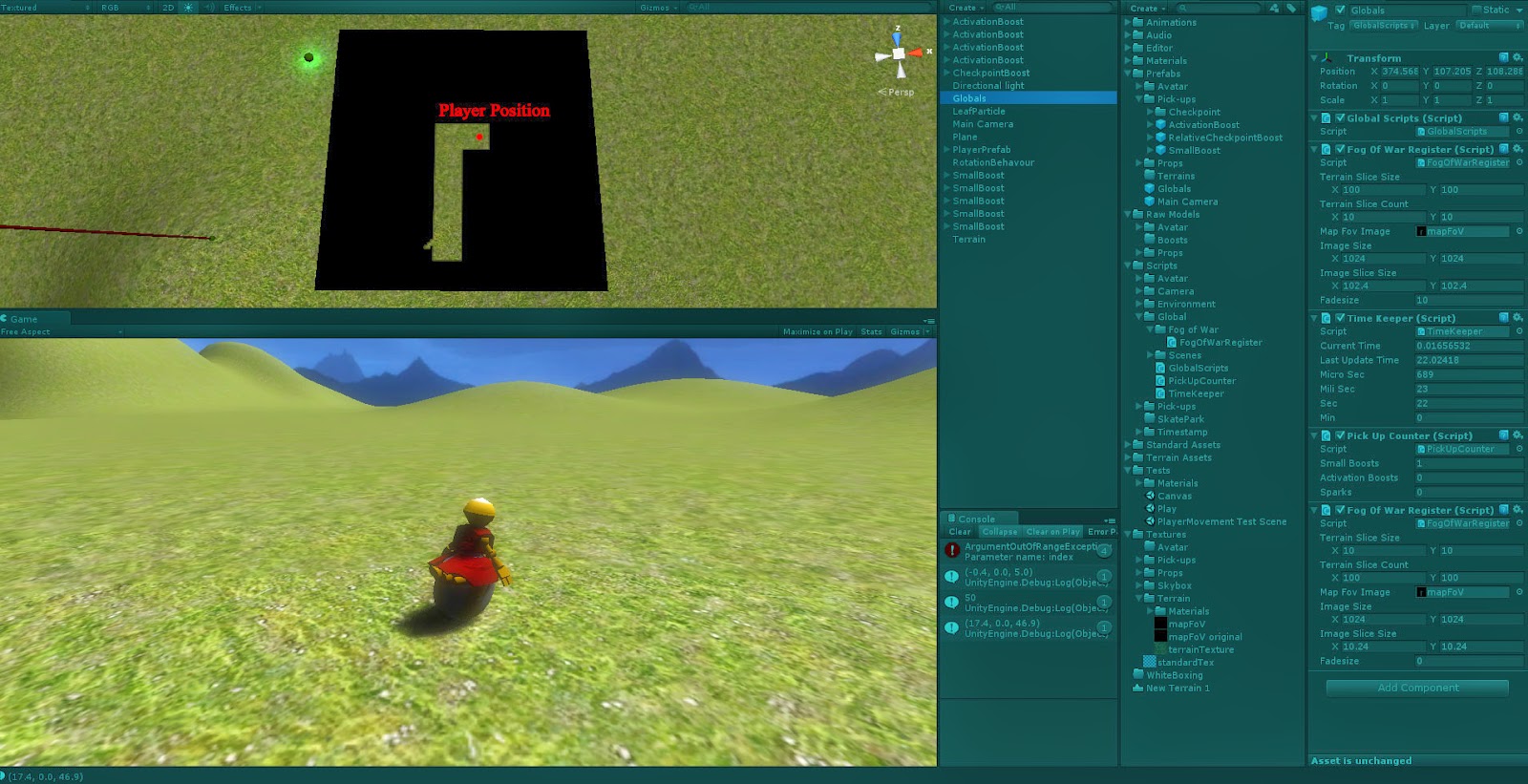
The last thing I've been working on is the FoW(Fog of War) for the game, in the game's level selection screen we are going to show a preview of the map with Fog of War where you haven't visited. I accomplish this by splitting the terain up in parts, then register when the player has visited one of these parts. This data is then converted into a texture with transparency where the player has been.

What's left to do is to add alpha-gradient to the borders of the visited areas.

That's all for today, goodnight and thanks for reading.
-David Forssell

fredag 21 februari 2014

Memory pools and Artificial Intelligence

As I sit here on this fine friday evening with some chilinuts and a cold one I realize that I haven't done an update for a while, mostly since I haven't got that much going on. So in this post I will talk mostly about our previous project (Portal in 2D) and the touch briefly on what I think I'm going to do next or sometime in the future.

The past!

So It's been about a month since the last course ended (Advanced c++ for Games) where me and  Petter Vernersson made a "clone" of Valve's game Portal in 2D. Though I'm not really going to talk about that game here is a link for anyone who want to try it out. (people without VS12 might need to install this aswell)
Believe it or not that is all programmer art, all credit to Petter!


What I'm going to talk about is something I worked on in that game, the memory manager. It's not a visible thing, nor is it a noticeable object in this specific project. A memory manager or "memory pool" as I will refer to it as, is a class that handles *surprise* memory. In short what a memory pool does is to allocate a large amount of memory and then designates that memory to any one who needs it, this is ideal for programs that creates and delete a lot of objects often.

In the words of IBM:
"malloc and new make calls to the operating system kernel requesting memory, while free and delete make requests to release memory. This means that the operating system has to switch between user-space code and kernel code every time a request for memory is made. Programs making repeated calls to malloc or new eventually run slowly because of the repeated context switching."

N.B. I will not describe the entire process of creating a memory pool, if you want to know more about that read the IBM documentation linked further down.

Now for some code!

//In the header
static std::vector<void*> m_Pool;
static std::vector<void*> m_gameObjectList;


static const int POOL_SIZE = 2048;
static const int START_GUARD = 0xde;
static const int END_GUARD = 0xad;
static const int MAX_BLOCKSIZE = 72;
static const int GO_SIZE;


//In the cpp file
const int MemoryManager::GO_SIZE = sizeof(GameObject);
void* MemoryManager::allocate(size_t _object)
{
void* block = 0;

//Allocate GameObject
if (m_gameObjectList.empty())
  {
    block = new char[(GO_SIZE + 4) * POOL_SIZE];
    m_Pool.push_back(block);
    inGOList(block);
  }

void* blockPtr = m_gameObjectList.front(); //Gets a block
*((static_cast<char*>(blockPtr)) + GO_SIZE + 3) = 1; //Block no longer free
  m_gameObjectList.erase(m_gameObjectList.begin());

  return blockPtr;
}

In this example we have a class known as GameObject, and every time an new instance of this object is created that instance  calls this function(this is done by overloading the new operator). 
And what this function does is to check if there are any free memory adresses in the list of memory adresses(m_gameObjectList), if there is, this instance requests the first adress in the list and marks it as taken. If there isn't any, it allocates "POOL_SIZE"(in this case 2048) new spots or (GO_SIZE + 4)* POOL_SIZE bytes where GO_SIZE is the size of a GameObject, the +4 will be explained in a second.

And to allocate new space the memory manager uses the inGOList function:
void MemoryManager::inGOList(void* block)
{
  char* c = (static_cast<char*>(block));
  for (int i = 0; i < POOL_SIZE; i++)
  {
    char* guardByte = &(static_cast<char*>(block)[(i*GO_SIZE) + (GO_SIZE + (4*i))]);

    *guardByte = START_GUARD;
  guardByte++;
  *guardByte = END_GUARD;
  guardByte++;
  *guardByte = GO_SIZE;
  guardByte++;
  *guardByte = 0;

  m_gameObjectList.push_back(&(static_cast<char*>(block)[i*GO_SIZE + (4 * i)]));
}
}
The extra 4 bytes(the +4 in the previous part) are designated to two guard bytes, one byte that tells the size of the object, and the last byte is to show if the spot is available(0 = available,1 = taken). In this example the byte representing the size isn't really necessary since this manager is only used by the class GameObject, but if it were to use more classes it would need this to easily know what type of class this spot is for, so for re-usability I keept it in.
The guard bytes are there as failsafes, this is a custom memory management system and during development things can go wrong and so when an object tries to delete itself if the guard bytes aren't where they should be we know that memory is corrupt and we have to close the program. This is mainly used for debugging or if you work in a large group and someone tries to use your memory manager for a class that isn't compatible with.


For anyone who is interested in Memory Pool's/Managers read this documentation from IBM, they describe it much better than I can: Link to the IBM reference.

The Future

So Today Mike Sellers had a lecture on AI for the third year students, and since I'm already taking another AI course this intrigued me a lot. He talk alot about, everything really, but what I found most interesting when he talked about feelings for AI. I started to think about "The Sims" and how they work, and thought it would be interesting to implement "The Big Five" in an AI environment and make them interact with each other and react to each other.
We'll see when I have time for this and how it goes.

That's all for today, goodnight and thanks for reading.
-David Forssell

tisdag 29 oktober 2013

Balancing Balancing and more Balancing.

Last day we had yet another balancing session, we were about half the group since the other half had other classes to attend. The goal of yesterdays sesion was to make the Wizard even stronger in the begining of the game and also try a new trap mechanic.
So inseed of doing an aditional 10+ saving throw for each trap and take two damage for each failed test, we tested and stuck with that you allways only take two damage no matter how many traps there are in a room.
The saving throw was lowered to 7+ and for each aditional trap in the room the you add 3 to the threshold, i.e. 1 trap 7+, 2 traps 10+, 3 traps 13+, and so on.
We decided to do this change since the traps were way to strong, especially during the endgame when the wizard could force the players to walk on the traps, so a 50/50 chance of taking 8 damage for about 6 mana was way to strong.

As for the wizard we tested to let him start at three mana and that helped alot more than we'd tought  But to reduce the heroes power at the start of the game, we removed alot of equipment and replaced them with consumable potions. This made the wizards spell "Demolish"(Destroy target equipment) alot more powerful since equipment was harder to come by.


Today we had a QA sesion with our primary teacher Adam, we only had half an hour with him and the game takes about 45 minutes to play. So needless to say he didn't get to finnish playing before the next group came along, but he did get sad when he had to stop playing which is a good sign. He liked the game and told us to just muck about with it this week, try and add classes, perhaps a town where you purches items and so on.


This is all for this week since I'm going to Gamex to show up a game I worked on last year called "Tribal Marathon"
That's all for today, goodnight and thanks for reading.
-David Forssell

fredag 18 oktober 2013

The process


The process of creating this board game wasn't hard but it wasn't a stroll in the park either. This tuesday we sat and created our core mechanic for this game, the wizards deck and mana-wheel. Whe then cut out som paper to have something to place tokens on and walk on as the Heroes and the we started to test the wizard.
It worked well and was interesting so we decided to develope the concept further.
The next day I could not be in school and work with the group since I have another course aswell, and so did Jonas. We told the group to create some loot cards for the Heroes and real monsters and traps and spells for the wizard. Jonas made some templates that the rest of the group could work with, like "Sword of Awesome +3 dmg in combat."

During the day I was still avalible on skype and asked the group how it was going, and I got the response that they where re-developing the entire movement-system since they didn't think the tiles mattered enought the day before when we only tested the wizard. They added different floors and tiles that could only be entered from specific directions.
A bit confused I told them to focus on creating the cards an said that we would talk about the movement-system the day after (Tuesday).

Tueseday came along and we met in the F-house of the school and started to talk, I explained that it wasn't that odd that they didn't find the movement-system interesting last time since we only had the focus on the wizard with his cards and mana. So we began to create the tiles and came up with the idea that the tiles should affect the wizards mana and hand. This made the tiles more meaningful and thus made everyone happy. We then spend the day balancing the tiles making it feel like the Heroes could stal the wizard from geting too powerful but never stop it. We also created new spells and monsters for the wizard and to make the vary more but still be fair, and loot cards to reward the players for moving around.

In the begining the mana-wheel had numbers from 1 to 16 on it, but after playtesting later in the week we realised that 16 is way to much mana for the wizard to have, so we decided to make it from 1-10 instead but still with 16 steps (making it go 1 2 3 4 5 5 5 6 6 7 7 8 8 9 9 10). The other choice we had was to increase the cost of his cards but both would work just as fine, and re-writing the spin was less tedious.

That's all for today, goodnight and thanks for reading.
-David Forssell

The results

So this week we've been developing an alpha prototype of our game.
You play as an evil wizard in his tower, or as heroes who tries to kill him. The wizard has a deck of cards that allows him to summon minions or traps or cast spells. 

They all cost "mana" and the wizards mana is decided by a mana-wheel which is placed in the center of the board, this wheel also represent the wizards tower.

The heroes move around on tiles that are flipped upside down and when a player moves onto a tile they flip that tile upwards.

All the tiles have different stats on them, the first icon is how the tile modifies the wizards mana-wheel and the second one is how the tile modifies the cards on the wizard's hand.
There are also three "key-tiles" that are placed by the wizard, the goal of the heroes are to gather those three keys to be able to enter the wizards tower.

If the heroes enter a tile with monsters on it, all of the heroes on that tile roll a d20, they then pick the highest roll and add all their equipment modifiers(I'll come back to this). The wizard rolls a dice and adds the level of all the monsters in that room. If the wizards combined roll is the highest the monsters win and the heroes return to their previous tile and lose one of their ten life points. If the heroes combined roll is the highest they kill the monsters and get to draw one loot card for the group of monster, no matter how many monsters there where.
Whenever a player enters an unexplored tile he also gets one loot card. If the tile is occupied by monsters he only get the loot from the room when the monster are defeated, i.e. if monsters are defeated on an unexplored tile you get two loot cards(one for the monsters and one for the tile). This is not per player, the players all split the loot from a room.


In the next post I will focus about the process of creating this game.

-David Forssell

söndag 13 oktober 2013

Boardgame Aesthetics

So this Wednesday I had a sit-down with my group where we were to come up with aesthetics for the Boardgame we are to make. Things went surprisingly smooth and within two hours we had a lot of ideas to work with.

The aesthetics we came up with was:
Exploring: We want the players to explore different "areas" and to force them to move around we added our second aesthetic.
Stress: To force the player to move around we will introduce stress in the form of time and objectives, the player will have to do a certain amount of things before the time runs out. The time doesn't have to be time as in seconds and minutes, preferably it will be "in game time"(turns in the game).
Challenge: We want the game to be challenging, not only in the way that the two aesthetics above create, but also in the sense that you have to conquer different enemies.
Fellowship: It's really usual that games sets the players against one another, we wanted the players to work with one another and create a co-operative experience.

We started to think about settings in which these Aesthetics would prospore and the first setting that came to mind was Caverns. It's perfect for Exploring since it can contain hidden tresures or fierce monsters; the monsters add Challenge and the players have to work together to survive the treacherous cavern and thereby creating Fellowship. But to increase the Fellowshipin the game we wanted to add an overmind, something that works against them and controls the cave. This could be an "AI" but that doesn't make the players unite as much as if it's another human being working against them and constantly stands in the way, so we added another player.
This players goal is to hinder the other players from completing their goals by placing enemies, setting traps, tirggering events and so on. This also helped to create Stress, since we could make the "overmind" stronger each turn eventually making it overpower the other players.
But this player will also feel Stress and Challange since that player have to stop the other players before they conqure the dungeon.


To add replayability we want to make the "cave-rooms" randomly generated. This could be achieved by the players picking tiles from a stack and then place them where they want to explore, or that the "overmind" creates a cavern beforehand; or perhaps that all the tiles are placed upside down in a random order(like in settlers of catan's preparation) and are then flipped when the players enter that room.

That's all for today, goodnight and thanks for reading. 
-David Forssell

tisdag 8 oktober 2013

A piece of my mind

I can't sleep so might as well scribble

Tomorrow I will meet my group and discuss an assignment in which we're to create a board game.
This week we are to come up with the aesthetics we want for the game we're making; I don't know what aesthetics I want in our game, I just know that I don't want to make a copy of any game we played in the previous assignment.
Our previous assignment was to play two board games and one roleplaying game, then analyze them and define and describe their core mechanic.
The board games we played was:

Gloom

The first game we chose was Gloom(here is a video of it worth watching). It's a card game where each player has five family members and your goal is to make your own family as unhappy as possible and then kill them. You do this by playing death, event and modifier-cards.
Each card has a title which promotes for storytelling, this is the greatest strength of the game since it's what makes the game more than just numbers on a character, you bond with the characters and their misfortune. Since you want to hear the stories you tend to not plan ahead for your next turn and therefore this game contains a lot of waiting for players.

Pro's: Easy to learn, creative, humorous.
Con's: Promotes not planing ahead, creating 'down time'.

Kingdoms

The second game was Kingdoms an accual "board" game since it contained a grid board; it also contained a number of tiles, some castles in various colors and a lot of coins. You place the tiles upside down and spread them out, each player then picks one tile which they are allowed to look at, 50 coins, a color and the corresponding castles.
The tiles contains a positive or negative number, this is the points all castles in a horizontal or vertical alignment with the tile gain or lose. The castles also have a number of dots on them, this is a multiplier that is used to multiply the score of any horizontal or vertical line the castle is placed on. The tiles also contains dragons which negates all the positive values the of the tiles in horizontal or vertical alignment with it, a gold mine which double the positive values aligned with it and mountains which blocks the effects of all tiles beyond them. Each turn a player may place a random tile, the tile they picked at the start of the game or place a castle and when the board is filled the players count their scores. The players then get their castles with one dot on them back and loses the rest and then plays the game two more times.

Pro's: Easy to learn, short game time, replayability.
Con's: Tedious to count score.

That's all for today, goodnight and thanks for reading.
-David Forssell